
For developers and data teams
Custom tools and AI agents on live floor-plan data
Floor plans in CAD files are drawings. Archilogic holds each floor as a structured spatial data model. In-house tools and AI agents read and update it through the Space API, the SDKs and the MCP Server.
- GraphQL
https://api.archilogic.com/graphql - MCP Server
https://mcp.archilogic.com/mcp - Floor Plan SDK
npm install @archilogic/floor-plan-sdk
Quickstart
First call in five minutes
- 1
Account and floor
The Starter plan covers up to 5 floor plans and includes REST API access, webhooks, and the Floor Plan SDK. The GraphQL API needs Space Graph on the account. Sign up. - 2
Access
The API and the SDK use a token from the access tokens page. An agent signs in with OAuth in the MCP client, so there’s no API key to manage. - 3
First call
Connect an agent tomcp.archilogic.com/mcp, post a query to/graphql, or load a floor withloadFloorById.
{
  "mcpServers": {
    "archilogic": {
      "command": "npx",
      "args": ["mcp-remote", "https://mcp.archilogic.com/mcp"]
    }
  }
}
mcp-remote connects to the remote MCP Server over Streamable HTTP. Sign-in uses OAuth 2.0. MCP Server docs ↗
Architecture
One record, six interfaces
Archilogic converts each drawing into the Space Graph, a model of spaces, elements, and products with typed attributes. Every interface works on that same record.
Input
- DWG
- DXF
- JPG
- PNG
Space Graph
BuildingFloorLayoutSpaceElementProduct
Custom attributes on floors, spaces, assets, and products. Geometry in meters.
- Space API, GraphQL
https://api.archilogic.com/graphqlquery - Space API, REST
https://api.archilogic.com/v2read · write - MCP Server
https://mcp.archilogic.com/mcpagents - Floor Plan SDK
@archilogic/floor-plan-sdkembed - Extension SDK
@archilogic/extension-sdkrun - Webhooks
POST https://api.archilogic.com/v2/webhookpush
Read by
- In-house tools
- AI agents
- Employee app
- IWMS
- Dashboards
Space API · GraphQL
A floor, its totals, and its rooms in one request
query ($floorId: ID!) {
  getFloorById(id: $floorId) {
    name
    area
    seatCapacity
    meetArea: area(where: { category: { eq: "meet" } })
    workArea: area(where: { category: { eq: "work" } })
    meetCount: spaceCount(where: { category: { eq: "meet" } })
    largeRooms: spaces(
      where: { category: { eq: "meet" }, seatCapacity: { gte: 16 } }
    ) {
      name
      subCategory
      seatCapacity
    }
  }
}
Filter by category, subCategory, area, seatCapacity, custom attributes, adjacency, and geometry. Filtering docs ↗
{
  "data": {
    "getFloorById": {
      "name": "Demo-sdk-live",
      "area": 1709.95,
      "seatCapacity": 366,
      "meetArea": 474.09,
      "workArea": 698.48,
      "meetCount": 18,
      "largeRooms": [
        {
          "name": "Montana",
          "subCategory": "boardRoom",
          "seatCapacity": 16
        },
        {
          "name": "Oregon",
          "subCategory": "boardRoom",
          "seatCapacity": 18
        },
        {
          "name": "Georgia",
          "subCategory": "hub",
          "seatCapacity": 35
        }
      ]
    }
  }
}
Areas are in square meters. The floor has 18 meeting spaces, and 3 of them seat 16 or more.
MCP Server
Agents answer spatial questions
- Remote and hosted. Streamable HTTP at
https://mcp.archilogic.com/mcp. Nothing to deploy. - OAuth 2.0 sign-in. Clients register themselves and refresh their own tokens. Connecting takes an account with the Admin role.
- Writes stay unpublished.Each call creates one revision, and it’s published only with
publish: true. - Custom operations.Each of the organization’s worker extensions appears as one more operation.
Example prompts from the docs
- Which assets are placed in each space on floor Y?
- Export floor Y as an SVG with meeting rooms highlighted
- Set the custom attribute "isBookable" to true for all meeting rooms on floor Y
13 operations · 10 read · 3 write
list_buildingsreadLists all buildings with their floors, addresses, and areas
list_floorsreadLists floors with filtering options (by name, area, seat capacity, space count, or space properties)
list_spaces_by_floorreadReturns detailed space data grouped by floor. Includes area, category, subcategory, and assets
get_floor_space_metricsreadComprehensive area metrics broken down by space category (work, meet, care, socialize, circulate, support), seat capacity, and space counts
get_floor_element_metricsreadFurniture/asset counts (workstations, lighting, seating, tables, storage) and building element data (windows, doors, walls)
get_space_asset_inventory_by_floorreadReturns the assets (furniture, equipment) placed in each space, grouped by floor
get_floor_filter_optionsreadDiscovers all filterable attribute values on a floor (categories, subCategories, custom attributes)
list_custom_attribute_definitionsreadLists your organization's custom attribute definitions for one resource type (floor, space, asset, or product) or all
export_floor_pdfreadGenerates a styled PDF floor plan with optional color-coded highlighting by category, subcategory, area, or custom attributes
export_floor_svgreadGenerates an SVG floor plan of the default layout or a specific layout, with the same highlighting as export_floor_pdf
set_nameswriteRenames spaces, assets, or the floor itself
set_custom_idswriteSets or clears the custom ID of spaces, assets, or the floor itself
set_custom_attributeswriteSets or removes custom attribute values of spaces, assets, or the floor itself, keyed by your organization's custom attribute definitions
Floor Plan SDK
Interactive floor plans inside an in-house app
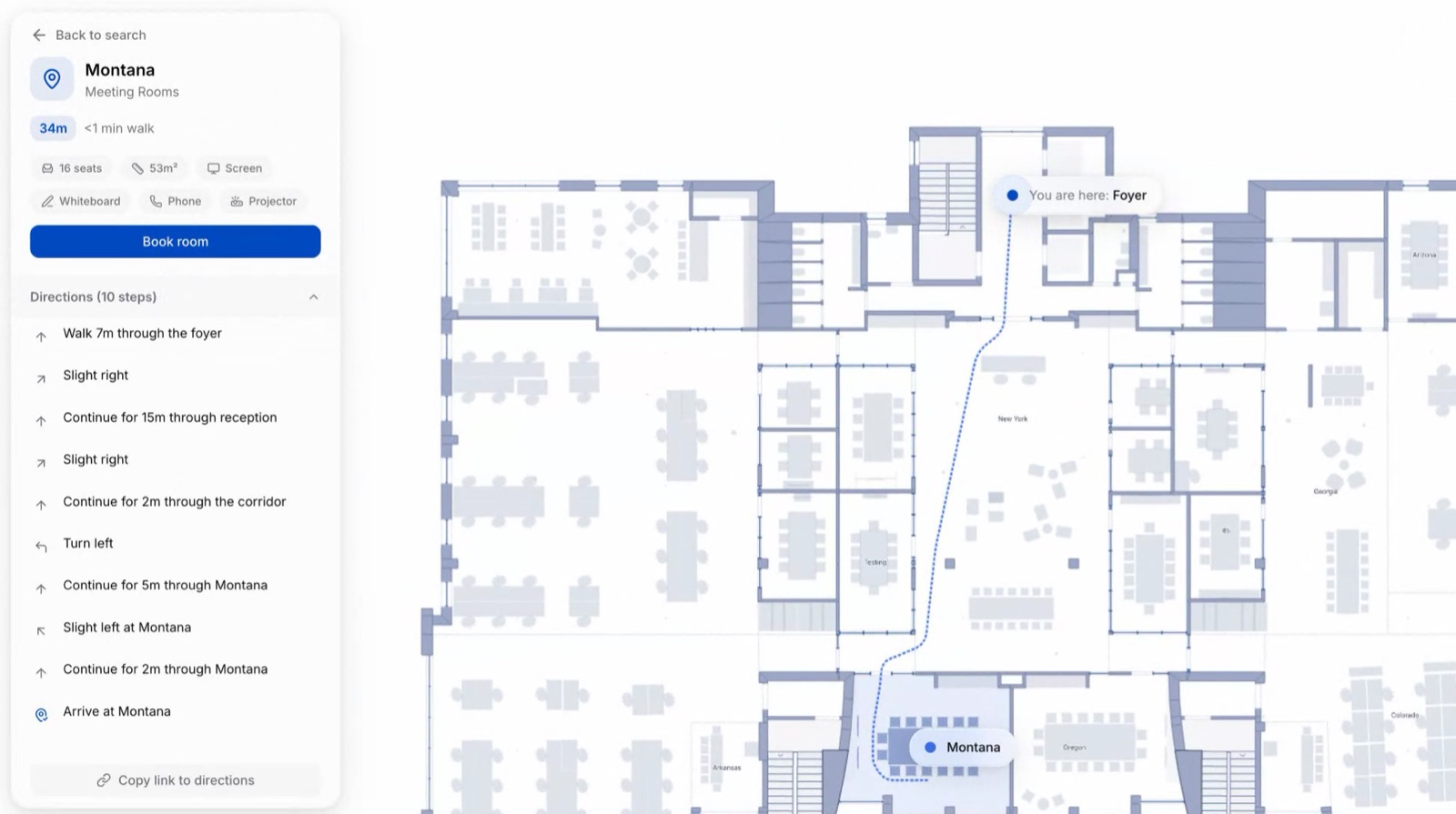
Sample app · MIT license
Kiosk app
A wall-mounted kiosk built with the Floor Plan SDK. It searches spaces and people and gives turn-by-turn directions, all on a public demo floor.
const options = {
  theme: {
    byFilter: [
      {
        where: {
          subCategory: 'meetingRoom',
          customAttributes: { isBookable: true }
        },
        style: { fill: '#65c389' }
      },
      {
        where: {
          subCategory: 'meetingRoom',
          customAttributes: { isBookable: false }
        },
        style: { fill: '#e56a59' }
      }
    ]
  }
}

const floorPlan = new FloorPlanEngine({ container, options })
floorPlan.loadFloorById(floorId, { publishableAccessToken })
Bookable and non-bookable meeting rooms in two colors. The last matching filter for a resource is applied. Theming docs ↗
Building a tool or an agent on floor-plan data?
Tell us what it should do, and we'll help with access and scoping.
For the workplace technology lead
Access, security, and operations
The layout the workplace team publishes is the same record the employee app, the IWMS, and the agents read. These are the controls around it.
- Tokens
Publishable, secret, and temporary access tokens
Publishable tokens restrict which domains can display public floors. Secret tokens stay in backend applications. Temporary tokens last from 15 minutes to 1 day.
- Scopes
21 scopes, including
floor:readPublic,floor:readPrivate, andfloor:updateRead access to public floors and to private floors is granted separately.
- Agent access
OAuth 2.0 through the MCP Server, for accounts with the Admin role
Write operations need the
floor:updatescope. They’re flagged as destructive and not read-only, so an MCP client can ask for confirmation first.- Change events
Webhooks for
floor,layout, andorderA layout fires
updatedandpublishedevents. Each delivery is signed with HMAC SHA256 in thex-archilogic-signatureheader, and the signing secret can be rotated.- Rate limits, REST
30,000 requests per 5 minutes per IP for reads, and 3,000 for queries, DXF exports, and 2D image exports
- Export formats
SVG, PNG, PDF, DXF, GeoJSON, IMDF, IFC, and GLTF
An export returns a download link that's valid for 30 to 60 minutes, depending on the format. GeoJSON comes back directly in the response.
- Sign-in and deployment
SAML SSO and an optional private instance
Available on the Enterprise plan. setApiUrls points the SDK at a private instance.
- Certification
ISO 27001:2022 certified, GDPR compliant
Write operations
set_names,set_custom_idsandset_custom_attributesrename spaces, assets and floors and set or clear their custom IDs and custom attribute values. And 4 more changes.Spaces and elements expose their geometry:
boundingBox(minandmaxas[x, y, z]),labelPoint([x, z], a point inside the contour to place a label at) andcontour(rings of[x, z]points, outer ring first, then holes). And 1 more change.Export floor as PDF (
POST /floor/{floorId}/pdf) now draws a scale bar in the bottom right corner of the page, so the plan can be measured on paper.Floor exports (SVG, PDF, DXF, IFC, glTF, IMDF, 2D image) and Export layout as SVG accept
filter=published|autosaved|allto pick the layout revision, like Get layout.Added setup for the ChatGPT Desktop app and for Codex (CLI and IDE extension), including sign-in and switching accounts. And 1 more change.
Docs
Reference and guides
- Space API, GraphQLEntry-point queries, resources, filters, and pagination.developers.archilogic.com/space-api/graphql/introduction
- Space API, RESTFloors, spaces, assets, layout operations, and exports.developers.archilogic.com/space-api/v2/introduction
- MCP ServerClient setup, sign-in, and the full list of operations.developers.archilogic.com/space-api/mcp-server/introduction
- Floor Plan SDKQuick start, theming, events, markers, wayfinding, and samples.developers.archilogic.com/floor-plan-engine/guide
- Extension SDKEditor extensions and cloud workers, with queries, operations, and exports.developers.archilogic.com/extension-sdk/guide
- AuthenticationToken types, all 21 scopes, and temporary tokens.developers.archilogic.com/space-api/authentication
Questions from developers
Which AI clients connect to the MCP Server?+
Any MCP client that supports remote Streamable HTTP connections and OAuth sign-in. The docs cover setup for Claude Desktop, the ChatGPT desktop app, the Codex CLI, and the Codex IDE extension.
Can an agent change a floor plan?+
Yes. The set_names, set_custom_ids, and set_custom_attributes operations write names, custom IDs, and custom attribute values. All the updates in one call are saved together as a single new layout revision, which stays unpublished unless the call passes publish: true.
Does the GraphQL API return geometry?+
Yes, since November 10, 2026. Spaces and elements expose boundingBox, labelPoint, contour, and dimensions, and all four work as filters. Values are in meters. For files, the REST API exports SVG, GeoJSON, IMDF, IFC, GLTF, DXF, PDF, and PNG.
How does a team add its own logic?+
With the Extension SDK. An extension runs inside the Editor or as a headless cloud worker. A worker extension can be called through the REST API, and the MCP Server exposes it to the organization as an operation.
Is there a way to try it before signing a contract?+
Yes. The Starter plan covers up to 5 floor plans and includes REST API access, webhooks, and the Floor Plan SDK. The GraphQL API needs Space Graph on the account.
How is the data protected?+
Archilogic is ISO 27001:2022 certified and GDPR compliant. SAML SSO and a private instance are available on the Enterprise plan.
Talk to us about tools and agents
Tell us what the team wants to build and where the building data lives today. We'll reply within one business day.
Trouble submitting? VPNs and privacy tools sometimes block HubSpot’s form service. Try disabling them, or email us at sales@archilogic.com.
Current floor plans behind the API
The workplace team keeps the floor plans current in the browser, and tools and agents pick up every published change.